


I love automation
Is there a better feeling than automating repetitive tasks? I freaking love it. This got me into programming, and to this date, that gives me the most joy. Knowing that I never need to do the same boring thing is dynamite.
I work on Windows, and I use it on my personal computer as well. I know... I am not a real computer enthusiast until I move to a proper Linux distro, but that will probably come sooner or later.
Until then, I am really grateful for AutoHotkey. The day I installed it on my work profile, my life changed. It is so powerful that every user who cares about time-saving should use it. Super easy to create beginner-friendly scripts. It is a great way to learn programming as well.
In the coming posts, I will share some scripts I have, starting with hotstrings.
Let me know if you see room for improvement or how you use automation for everyday tasks.
Hotstrings
Let’s start with an example:
::btw::by the wayThe abbreviation btw will be automatically replaced with "by the way" when I trigger it with an ending character such as Space.
Using the logic above, you can create shortcuts to your name, email, or even longer strings that you type many times, like some general email templates.
::_mail::Johndoe@gmail.com
::_name::John Doe

::text1::
(
Any text between the top and bottom parentheses is treated literally.
By default, the hard carriage return (Enter) between the previous line and this one is also preserved.
    By default, the indentation (tab) to the left of this line is preserved.
)
Basically, Hotstrings are simple text replacement tools. They are easy to create and super fast with AHK.
I also have a few SQL-specific hotstrings:
::sel::SELECT
::seldis::SELECT DISTINCT
::sdis::SELECT DISTINCT
::cw::CASE WHEN
::wh::WHERE
::gr::GROUP BY
::gb::GROUP BY
You can add your most-used tables and filters. Most SQL editors provide this functionality, but AHK is super fast, and the hotstrings are easy to define, so I would always default to it instead of creating these in the SQL editor.
Modifiers and Hotif
You can define hotstrings with several modifiers and their combination:
C - Case-sensitive trigger* - Trigger even without an ending character? - Trigger inside other wordsO - Omit the ending character
There is also another awesome functionality, the Hotif modifier.
You can wrap your hotstrings (and hotkeys) between Hotifs, and your code becomes context sensitive.
For example, the below will limit my hotstrings to Power BI. This feature allows me to define the same hotstrings for different apps with different actions.
Here is the example that combines the hotifs and modifiers:
#Hotif winactive("ahk_exe PBIDesktop.exe")

:O:cal::CALCULATE(){Left}
:O:cr::COUNTROWS(){Left}
:O:ret::RETURN{Shift down}{Enter}{Shift up}
:CO:var::VAR _
:CO:VAR::VAR _
::sel::SELECTEDVALUE(){Left}
::sv::SELECTEDVALUE(){Left}
::kf::KEEPFILTERS(){Left}
::rf::REMOVEFILTERS(){Left}
::treatval::TREATAS(VALUES( )){Left}{Left}
::swtrue::SWITCH(TRUE(), ){Left}{Shift down}{Enter}{Shift up}

#Hotif
Another feature present in this code is the key input action. For example, when I type cal in Power BI and trigger the action with a space, AHK will “type” CALCULATE() then it will simulate the Left keypress to go into the brackets.
Autocorrect
Hopefully, you now see how hotstrings can change the way you code or type in general, but the biggest improvement AHK hotstrings can provide is a unique autocorrect script that can be adjusted to address your frequent typos.
Here is a great repository that already has thousands of corrections, and you can easily extend the list. It has a built-in GUI as well, so you can quickly add some words or substrings.
https://github.com/kunkel321/AutoCorrect2
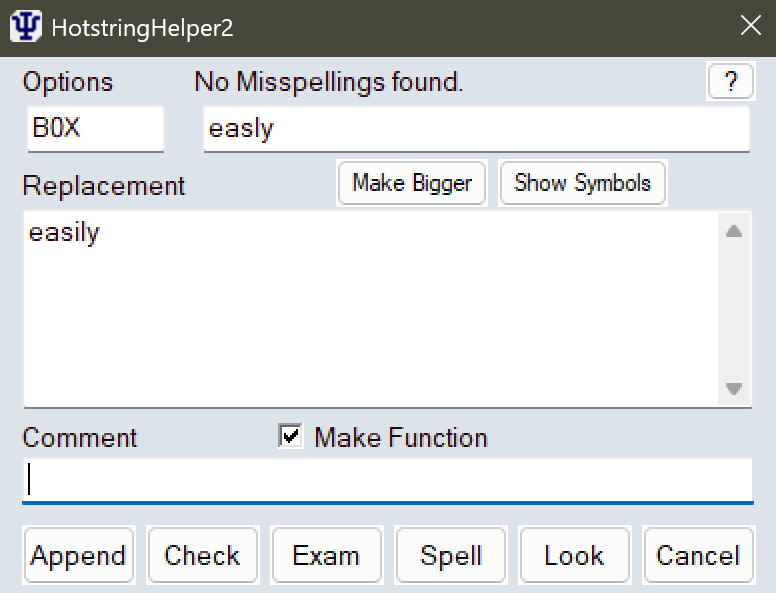
This script is genius, it works in the background seamlessly, and is quick and efficient.
Hotstrings are just the entry-level stuff that AHK provides. Next time, I will share some Hotkeys that I use with more advanced scripts.